
How to Create a Software Development Project Plan: A Step-by-Step Guide
Learn how to create an effective software development project plan. Step-by-step guide covering scope, timelines, methodologies, and templates.

Building software is expensive, slow, and risky. It becomes even more complicated when if you start without a clear plan.
Poor planning costs billions. The Consortium for Information & Software Quality (CISQ) estimates that unsuccessful software initiatives cost around $260 billion annually in the U.S. alone and the global losses are significantly higher.
A strong software development project plan changes that. It helps teams define what they’re building, why they’re building it, and how they’ll get there. It keeps project managers, remote developers, and business leaders on the same page. It turns ideas into a real development process instead of chaos.
This guide is for founders, CTOs, and product leaders who need to build or scale a software development project without waisting time or money. We’ll break down how a project plan actually works, what should be inside it, and how to build one that leads to project success.
What is a software development project plan?
A software development project plan is a roadmap for your software. It includes what needs to be built, who’s building it, when it will be done, and what resources are required. Without such a project plan, teams can easily get lost in the details, miss deadlines, or go over budget.
Definition and purpose of an SDP
The main goal of an SDP is simple: help everyone understand the plan and follow it. It guides your project team through the entire software development process. It includes all stages, namely gathering requirements, writing code, testing, launching the product, etc. Software project plan also helps you spot problems at the early stage, make sure you use resources wisely, and keep your project aligned with your business goals.
Software development plan vs. project management plan
A lot of people confuse a software development plan with a general project management plan, but they’re not the same:
- A project management plan covers high-level logistics like budgets, schedules, and reporting.
- A software development project plan digs into the technical side: what features will be built, in what order, how the code will be tested, and when milestones are hit.
Think of the SDP as the special playbook for your development team. On one hand, it tracks the progress. On the other hand, it makes sure everyone knows what to do, when to do it, and why it matters.
Why you need a software development project plan
Even the most talented teams can face considerable problems, if they start a software development project without a clear plan. A software development project plan (SDP) becomes a roadmap that keeps your development team focused and your project participants informed. At the same time, it allows to keep the project on track from start to finish.
Benefits of effective software project planning
A well-thought-out software project plan brings real advantages for your business:
- Stay on budget and on schedule: According to the McKinsey research, 45 % of IT projects go over budget and 56 % deliver less value than expected. That's why proper planning helps manage project costs, track project milestones, and prevent unpleasant surprises.
- Identify risks early: PMI states that more than 70% of projects experience serious difficulties. Each development project comes with different risks, including technical issues, changing requirements, or resource bottlenecks. A solid SDP includes risk management strategies to spot problems before they escalate.
- Optimize resources: Proper resource allocation ensures your team members are working on the right tasks and don't wast time. As a result, you can avoid unnecessary overtime.
- Align stakeholders: When all project stakeholders know the project scope and project timelines, communication improves, expectations are clear, and decisions are faster.
- Define accountability: Having a software development project plan allows roles and responsibilities to be clearly outlined. As a result, everyone on the project team understands what they own, which makes progress tracking straightforward and prevents confusion.
Companies often benefit from leveraging full-cycle product development services, which help plan and execute every stage from ideation to launch. These services ensure your software development plan considers technical, design, and market factors from the start.
What happens without proper planning
Projects often go off course without a software development plan:
- Teams may work on the wrong priorities or duplicate efforts.
- Deadlines slip.
- Project costs grow fast.
- Stakeholders become frustrated.
- Communication breaks down because the project dos't meet expectations.
- Risks go unnoticed until they turn into costly problems for the business.
That's why investing time in a software development project plan in the very beginning will save your team time and protects your budget. Besides, it increases the chances of delivering a software product that meets business goals.
Key components of a software development plan
It's important to understand that a good software development project plan far from just a schedule. It includes different components that makes it easier to deliver software on time, on budget, and with the high quality.
Project scope and objectives
First of all, start by defining what the project needs to achieve. The project scope lists features, functionality, and boundaries. In such a way, everyone knows what’s included and what isn’t. This keeps your team members focused and helps avoid scope creep. Clear objectives also make it easy to measure project success and keep all project stakeholders aligned.
Team structure and roles
Every project works best only when everyone knows their responsibilities. You need to identify each team member’s role. Include all experts that work on the project: web or mobile app developers, graphic designers, QA engineers, project managers, etc. When all team members know what at which project develop stage their colleague are, it simplifies the whole process. It prevents confusion, ensures accountability, and makes it easier to track progress. This component of a software development plan also helps when the business works with the remote teams or outside partners.
Timeline and milestones
Breaking the work into a project timeline with milestones allows keeping the whole team on track. Milestones can be key points like completing the first prototype, finishing testing, or launching a beta. They act as checkpoints controlled by project managers and team members. They make it easy to monitor progress and adjust plans if something falls behind.
Resource allocation and budget
A software project plan should detail how your resources, including people, tools, and budget, are assigned to each task. Clear and logical resource allocation prevents overloading team members and avoids wasted time. What's more, it also keeps project costs under control. Without it, even small delays can become expensive problems.
Risk management strategy
Every software project faces risks. What's more, according to PMI, approximately 70% of projects fail. that's why a solid plan can identify potential risks in advance. It prevents technical issues, schedule delays, or changing requirements before they happen. Include mitigation strategies and backup plans so your team can respond quickly and keeping the development process smooth.
Quality assurance and testing plan
Quality is a key success factor for any software development pro. A QA and testing plan explains how the software will be checked at every stage. This includes functional testing, usability testing, and bug tracking. Testing early and often prevents major rework later and ensures the software’s functionality meets the intended goals.
Communication and reporting framework
Finally, a plan should describe how your team and stakeholders will stay in sync. Decide on regular check-ins, reporting formats, and dashboards. Good communication keeps everyone on the same page and speeds up decision-making. It also helps project managers address issues before they become bigger problems.
How to create a software development project plan (step-by-step)
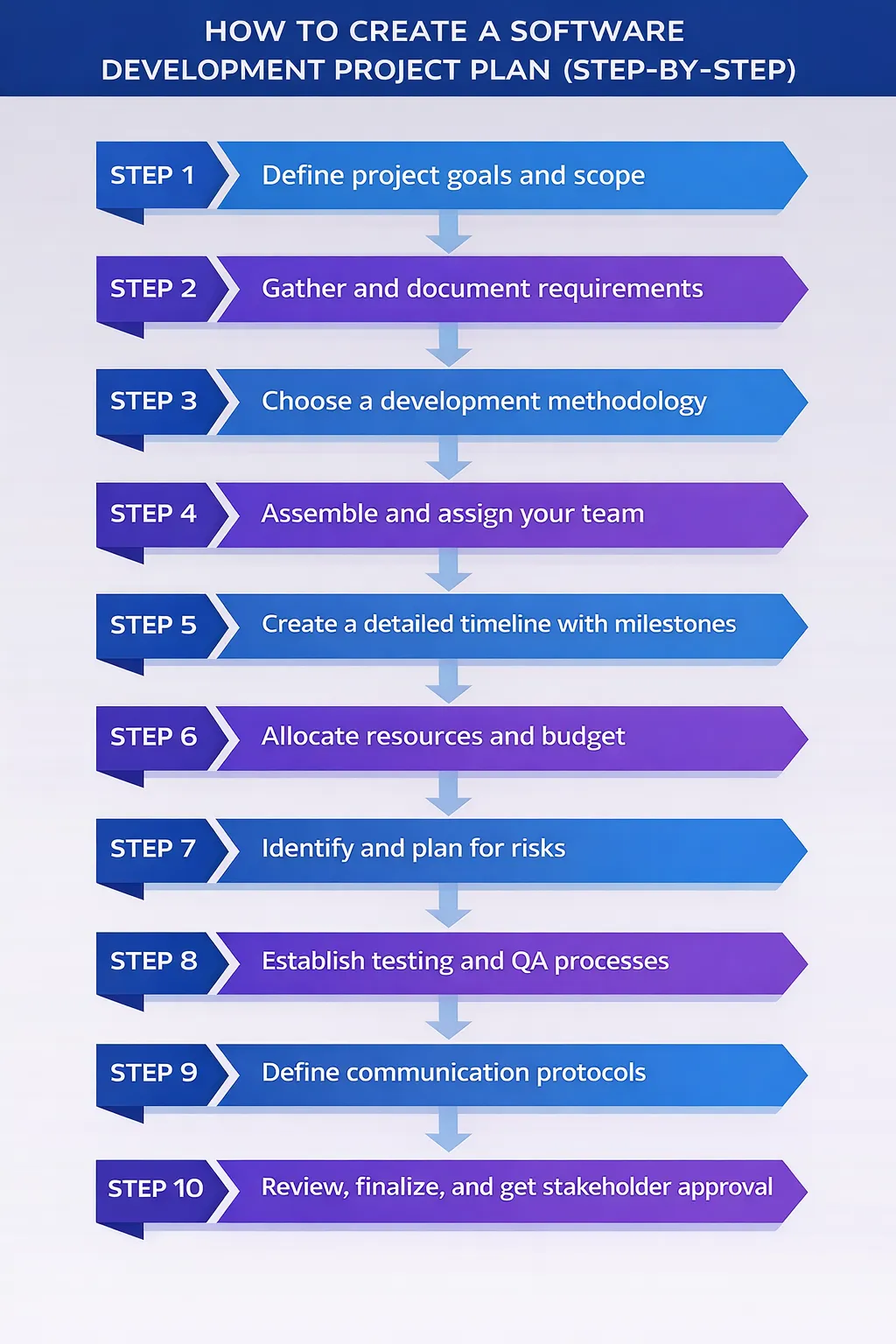
Let's view each planning stage in details.
Step 1: Define project goals and scope
It's very important to start creating the software development project plan with business problem, not the features. The whole team needs to understand what should change after the project is finished. Will you software project bring more users, faster processes, lower costs, better experience? Identify 2–3 clear project goals.
Then describe the project scope: what you will build, for whom, and within what limits. Also write what is out of scope. This part of the software development project plan protects you from scope creep and constant last-minute changes.
When defining project goals and scope, consider whether an MVP (Minimum Viable Product) approach makes sense. Focusing on core functionality first allows you to validate assumptions, gather user feedback, and iterate faster, which keeps the project plan lean and practical.
Step 2: Gather and document requirements
Collect input from users, business teams, and technical experts. External and internal market analysis can become key success factors.
Further, turn ideas into clear requirements. Identify what the system must do, how users will interact with it, and what results it should produce. Use simple language, user stories, and examples. Well-written requirements are the backbone of any software project development plan. It will reduce rework later.
Step 3: Choose a development methodology
This step defines how your software development project will actually move from idea to release. The methodology you choose affects your project schedule, communication style, risk level, and how often you can change direction. Software developers use different methodologies worldwide.
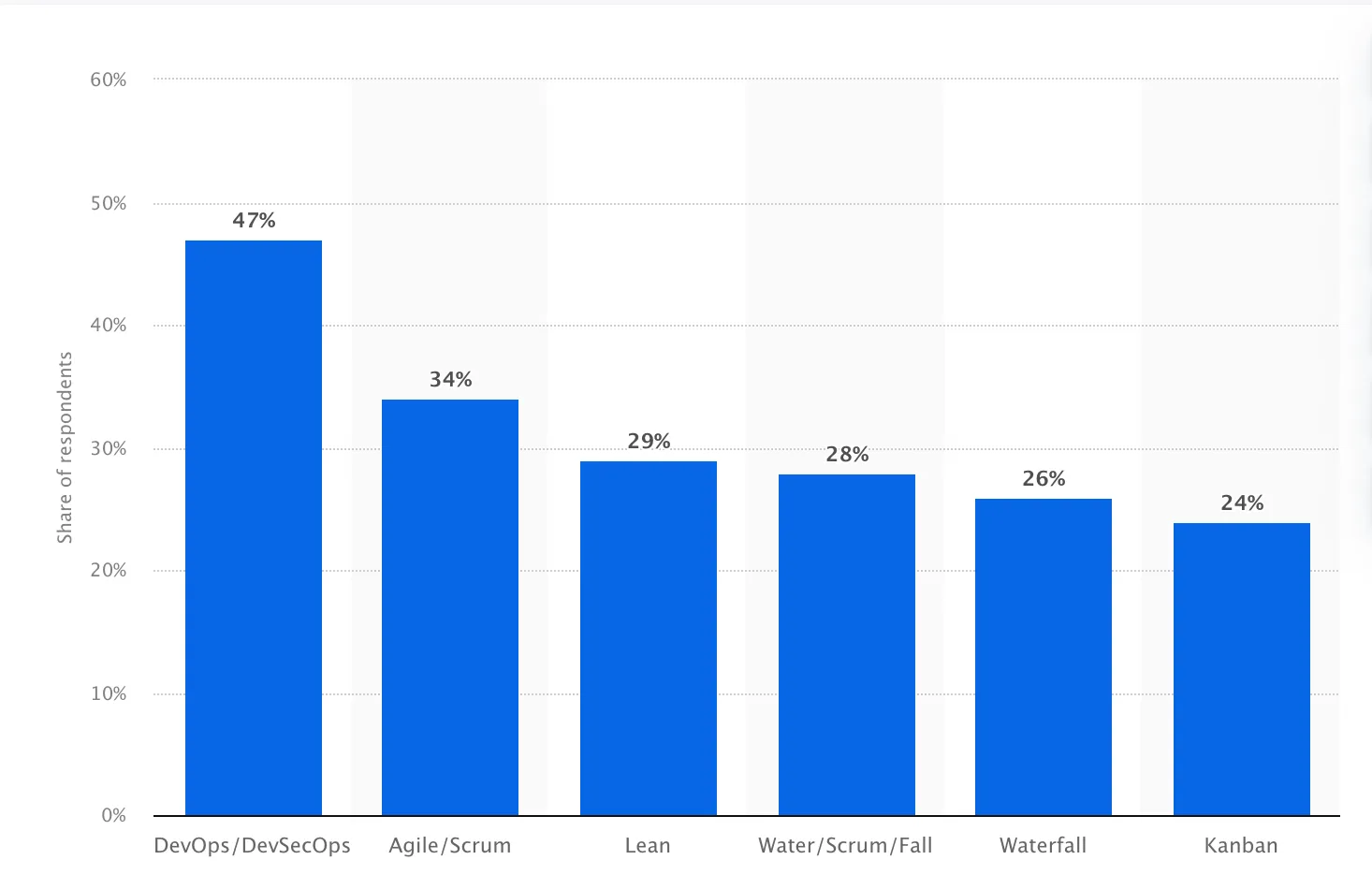
Breakdown of software development methodologies. Source: Statista
When choosing the methodology, you need to look at:
- How clear your requirements are
- How often you expect changes
- How involved stakeholders will be
- How experienced your development team is
There is no method that fits all projects. The right business development methodology is the one that matches your project goals, team skills, and business reality.
Step 4: Assemble and assign your team
Developing a project plan for creating effective software development solutions, it's important to define all roles. The list needs to include project managers, developers, designers, testers, analysts, and stakeholders. Also, outline who makes decisions, who delivers project tasks, and who approves results. A good software development plan always shows clear ownership. It's a bad practice when a task is everyone’s job and therefore nobody’s job.
For startups or growing companies without a full-time technical leader, CTO as a Service can provide strategic guidance during project planning. This ensures your software development project plan is realistic, technically sound, and aligned with business goals even before hiring a full-time CTO.
Step 5: Create a detailed timeline with milestones
In order to launch all required steps properly, you need to split the work into phases and specific tasks.
It's important to add deadlines, dependencies, and checkpoints. Milestones help track project progress and allow early corrections. A strong software project plan shows not only when the project ends, but how it moves forward step by step.
Step 6: Allocate resources and budget
Estimate how many people, hours, and tools you need to complete the project in required quality.
Count all the details, including development time, testing, management, infrastructure, and support.
Don't forget to add a buffer for unexpected work. Good resource allocation in your software development plan helps control costs and prevents overload of the development team.
If your in-house resources are limited, software outsourcing allows you to scale your team efficiently. Proper planning ensures smooth collaboration with external partners, clear ownership of tasks, and alignment with your overall project timeline.
Step 7: Identify and plan for risks
The majority of projects face considerable risks. A good detailed project plan needs to include the list of technical, business, and operational risks.
For example, unclear requirements, tight deadlines, key people leaving, unstable technologies.
Once you identifies the risks, define actions to reduce their impact. Risk planning makes the software development project plan stronger and more realistic.
Step 8: Establish testing and QA processes
Quality is a key success factor for any project plan. That's why schedule quality control checks from the start. Define what “good quality” includes: performance, security, usability, stability which each metric having specific criteria. In addition, set testing stages, which include unit tests, integration tests, user testing. A serious software development plan treats quality as a process, not a final step.
Step 9: Define communication protocols
A comprehensive plan also need to cover the communication between all the participant. Decide and describe how information flows between teams. Ensure that you keep stakeholders informed. For this matter, set different meeting types, report formats, tools, and response times. Clear communication plan prevent misunderstandings and delays.
Step 10: Review, finalize, and get stakeholder approval
The final stage of the software development plan template is review and finalization. Analyze the plan with all key stakeholders. Check project's objectives, scope, timeline, financial resources required, key performance indicators, risks, and responsibilities.
After approval, the software development project plan becomes the main reference for the whole project lifecycle. It guides decisions, helps track progress, and supports successful delivery.
Agile vs. Waterfall: Choosing the right methodology
The right choice depends on how clear your requirements are, how often they change, and how your team and stakeholders work together. Picking the wrong model can slow delivery, increase costs, and frustrate everyone involved.
Agile vs Waterfall Software Development Comparison
| Aspect | Agile Development | Waterfall Development |
|---|---|---|
| Planning style | Flexible and evolving | Fixed and detailed upfront |
| Development flow | Iterative, in short cycles (sprints) | Linear, step-by-step stages |
| Requirements | Can change during the project | Must be defined at the start |
| Feedback | Continuous, after each iteration | Mostly at the end |
| Testing | Ongoing during development | Happens after build phase |
| Delivery | Frequent small releases | One final release |
| Risk handling | Issues found early | Problems often found late |
| Documentation | Lightweight, updated as needed | Heavy documentation upfront |
| Client involvement | Regular reviews and feedback | Limited after planning phase |
| Best for | Startups, new products, fast-changing markets | Stable, regulated, fixed-scope projects |
| Change handling | Easy to adapt | Costly and slow to change |
| Project control | Based on real progress | Based on plan compliance |
| Team structure | Cross-functional teams | Role-based, sequential teams |
| Time to market | Faster initial releases | Longer before first release |
When to use Agile planning
Agile works best when requirements may change or are not fully clear at the start. 34% of businesses follow it in their software projects. The development team works in short cycles, often called sprints. After each cycle, stakeholders review progress and give feedback. This allows you to adjust the software development project plan as you go. Agile project management methodology suits software development for startups or new products.
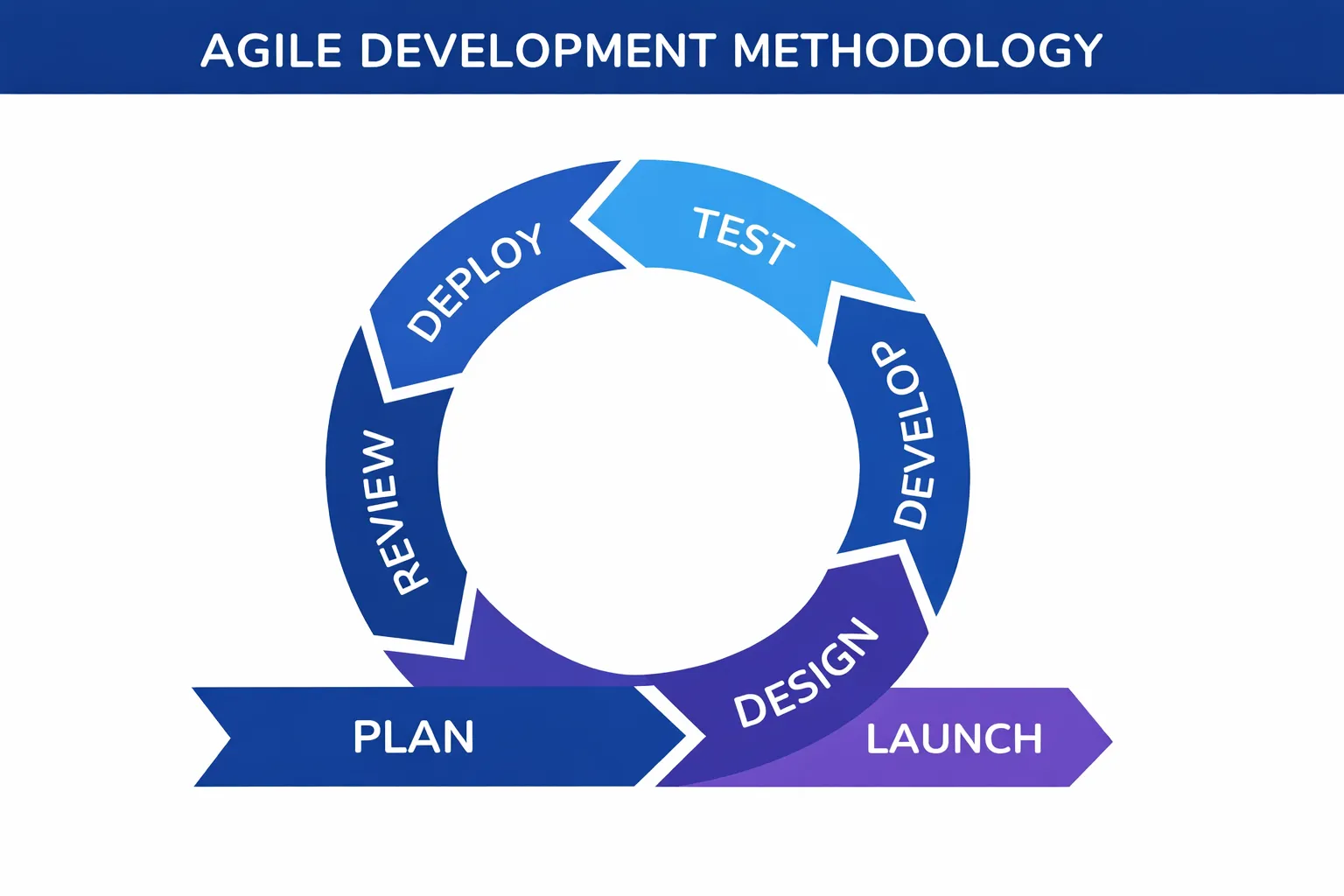
Agile planning makes sense if:
- Requirements are likely to change
- You want to test ideas with users early
- Business teams can review work often
- The project can be built in small parts
- Fast learning is more important than fixed plans
When to use Waterfall methodology
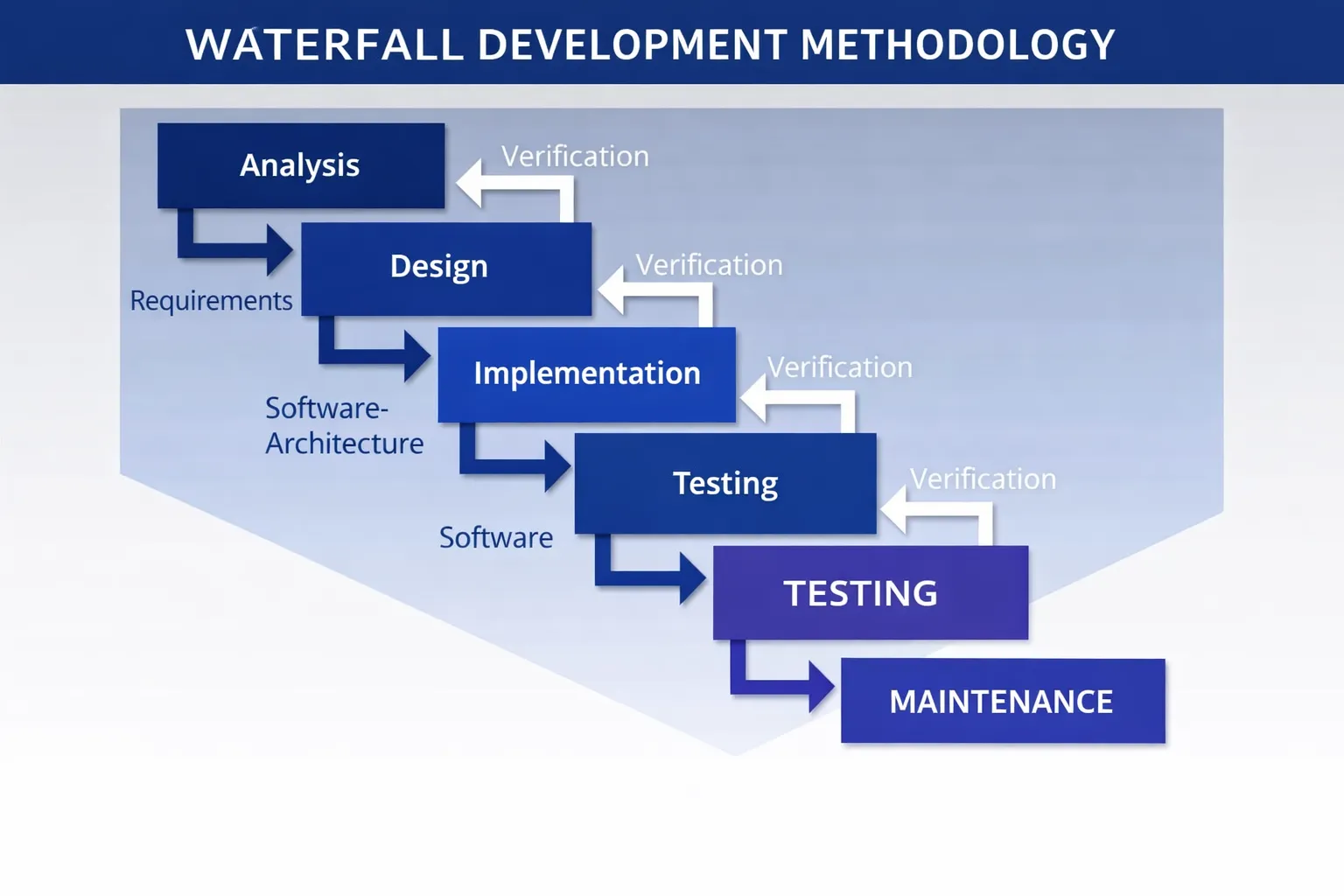
On the contrary, the Waterfall methodology follows a strict order in planning, design, development, testing, and release. It fits approximately 28% of projects. It's important to complete each stage before the next begins. This model fits projects with stable requirements, strong regulations, and fixed contracts.
Hybrid approaches for complex projects
Many projects don’t fit fully into Agile or Waterfall. That's why the most effective way is combining both models.
A hybrid project plan usually means:
- Main scope, budget, and timeline are set early
- Development happens in short cycles
- Feedback is used to improve later stages
- Testing and release follow fixed steps
Best project management tools for software development
According to Statista, 60.7% of companies use collaboration tools and 53.4% of organizations use various product and task management tools on a daily basis.
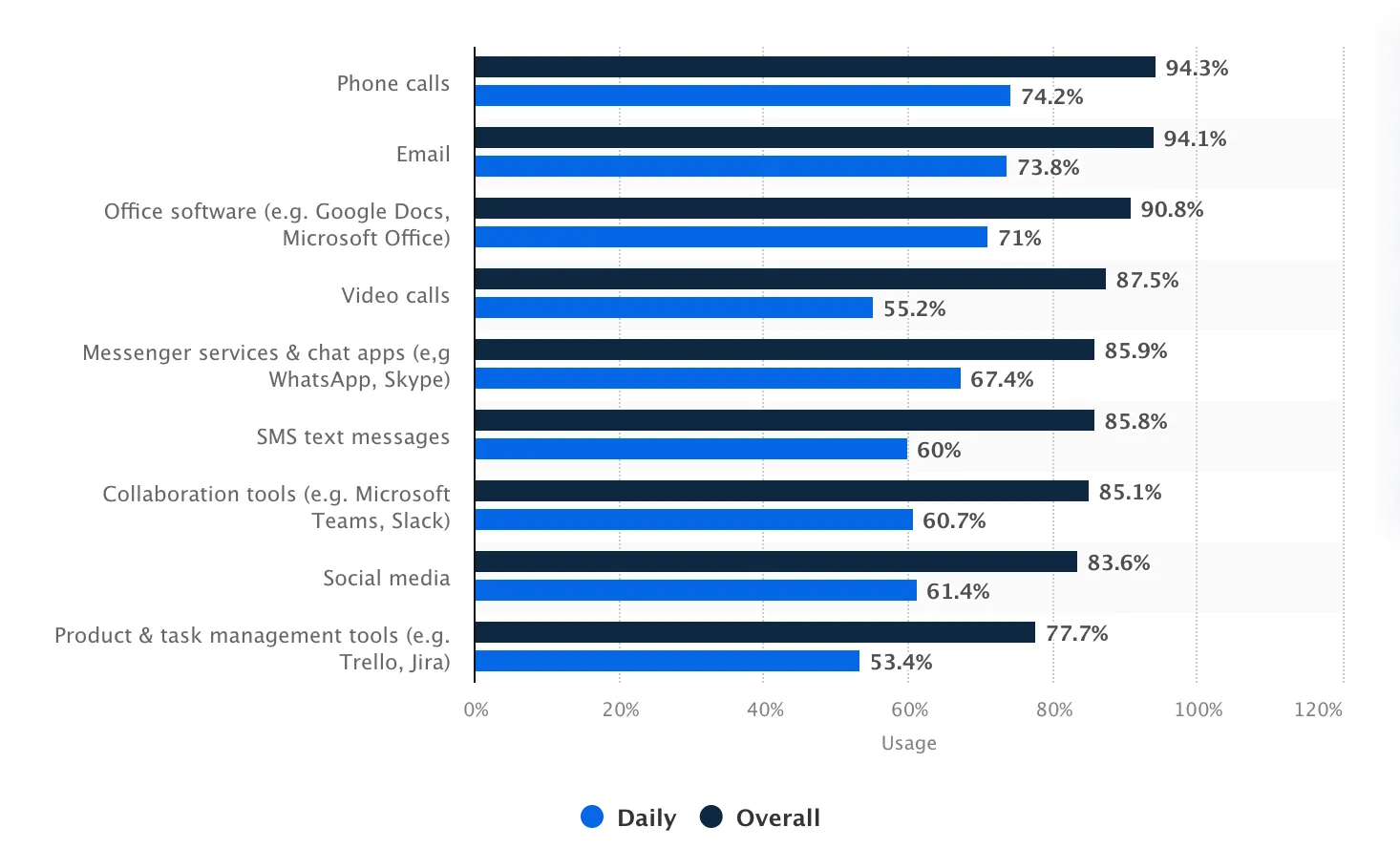
Choosing the right tool makes planning and delivery easier. The right project management tools help teams track tasks, visualize progress, share updates, and keep stakeholders aligned. Below are the best options for different methods and team setups.
Tools for Agile teams
For teams working in short cycles that need frequent feedback, it's better to use tools that support sprints, boards, and flexible workflows:
- Jira – Built for Agile/Scrum teams. Excellent for sprint planning, backlog management, bug tracking, and reporting. It handles complexity without losing focus on iteration.
- ClickUp – A flexible all-in-one tool with docs, goals, and time tracking. Good for teams that want both structure and customization.
- Trello – Simple, card-based Kanban boards. Easy to adopt for smaller teams or early-stage products that need visual task tracking.
- Asana – Strong for cross-functional collaboration. Great for backlog management and tracking work across teams.
These tools help teams iterate quickly, prioritize work, and adapt the plan as the software development lifecycle progresses.
Tools for Waterfall and hybrid approaches
When your plan is linear or larger parts of the project require fixed stages, use the tools that offer structure and visibility:
- Microsoft Project – Robust for enterprise-level planning with critical path analysis and resource calendars. Ideal where detailed scheduling and forecasting matter.
- Zoho Projects – Cost-conscious but capable, with Gantt charts, time tracking, and integration across the Zoho suite.
- Wrike – Strong resource management, reporting, and dependency tracking. Works well when multiple teams or streams must align.
- Teamwork – Good choice for service-oriented teams, with client portals and profitability tracking built in.
- Basecamp – Simple interface and flat pricing. Best for teams that want clear communication without complexity.
These tools make it easier to track phases, report status, and stick to a structured timeline when change is less frequent.
How to choose the right tool for your project
There’s no solution that would fit all organizations. The best choice depends on your team, your process, and how you plan and execute work:
1. Match the tool to your methodology
If you are iterating often and expect change, Agile-focused tools like Jira or ClickUp help. If your plan is sequential and stable, a Waterfall-friendly tool like Microsoft Project or Wrike may work better.
2. Think about team size and needs
Small, co-located teams may prefer simple tools like Trello or Basecamp. Larger, distributed teams need more powerful planning, reporting, and tracking features. You can also consider app development consulting.
3. Look for integrations
Choose tools that connect with your code repositories, communication platforms, QA systems, and reporting dashboards. This reduces manual work and errors.
4. Prioritize ease of use
A tool with too many features can slow teams down. Pick one that your team can adopt quickly and use consistently.
5. Check cost vs. value
Evaluate licensing costs against what you actually need. Some tools charge per user, others offer flat rates with more features included.
Common mistakes to avoid in software project planning
Even strong teams fail when the plan is weak. Most problems don’t start in development — they start on paper.
Unclear goals and scope
If the team doesn’t know what “done” means, everyone will build their own version of success. Vague goals lead to endless changes, missed deadlines, and budget leaks. Every software development project plan needs a clear outcome, boundaries, and success criteria.
Skipping proper requirements
Rushing into development without written, approved requirements is a fast way to build the wrong product. When needs live only in someone’s head, they change every week. This creates rework, frustration, and wasted money.
Underestimating time and effort
Teams often plan based on best-case scenarios. Real life brings bugs, sick days, delays, and changes. A good plan always includes buffer time and realistic effort estimates.
Ignoring risks
No project is risk-free. Technical limits, budget cuts, team changes, or vendor issues can happen anytime. If risks aren’t listed and planned for, they turn into emergencies instead of managed problems.
Poor role definition
When responsibility is unclear, tasks fall between people. Work gets duplicated or forgotten. Every part of the software project plan should show who owns what — and who makes final decisions.
Weak communication rules
If no one knows how updates are shared, people work in the dark. Missed messages cause delays, wrong priorities, and frustration. A plan must define meeting rhythm, reporting format, and main communication channels.
No testing strategy
Leaving testing “for later” usually means fixing bugs under pressure. Quality should be part of the plan from the start, not a last-minute step.
Not updating the plan
A project plan is not a statue. If it isn’t reviewed and updated when things change, it becomes useless. A good software development project plan lives and grows with the project.
Software development project plan template
A good template saves time, keeps everyone on the same page, and prevents important steps from being skipped. It doesn’t replace thinking or managing. On the contrary, it supports them.
Free template checklist
Use this checklist to build your software development project plan from scratch:
- Project name and short description
- Project goals and business objectives
- Project scope (what’s included and what’s not)
- Key stakeholders and decision makers
- Project manager and responsible leads
- Development methodology (Agile, Waterfall, Hybrid)
- Development team and roles
- Detailed requirements and user stories
- Project timeline and key milestones
- Work breakdown structure and task list
- Resource allocation and budget
- Risk management plan and mitigation strategies
- Quality assurance and testing approach
- Communication plan and reporting schedule
- Tools and technology stack
- Approval and sign-off section
If you can fill in every line honestly, your project is already ahead of most.
Example project plan structure
- Project overview
Short explanation of what you’re building and why. - Project goals and success criteria
Clear targets, not vague promises. Include how success will be measured. - Scope definition
List what is inside the project and what is out. This prevents scope creep. - Requirements and user stories
Functional needs, business rules, and user expectations. - Development methodology
Explain how the team will work and why this method fits the project. - Team structure
Roles, responsibilities, and who approves what. - Timeline and milestones
Phases, key dates, and delivery points. - Tasks and work breakdown structure
All the tasks needed to complete the project. - Resources and budget
People, tools, infrastructure, and financial resources required. - Risk management
Potential risks, impact, and contingency plans. - Quality assurance
Testing stages, quality control, and acceptance criteria. - Communication plan
How stakeholders stay informed and how progress is tracked. - Approval
Sign-off from key stakeholders before work begins.
Conclusion
A well-structured software development project plan is the key to delivering products on time, on budget, and with high quality. The right approach, clear requirements, and strategic guidance make all the difference.
Partner with Empat, recognized as one of the Top 100 Fastest Growing Companies 2025 by Clutch, with deep expertise in fintech, healthcare, and startup software development, to plan smarter, reduce risks, and bring your software vision to life.
FAQ
What is a software development project plan?
A software development project plan (SDP) is a comprehensive document that outlines the scope, objectives, timeline, resources, and activities required to successfully develop and deliver a software product. It serves as a roadmap guiding the development team through the entire software development lifecycle (SDLC).
What are the key components of a software development plan?
The key components include: project scope and objectives, team structure and roles, detailed timeline with milestones, resource allocation and budget, risk management strategy, development methodology, quality assurance and testing plan, communication framework, and documentation standards.
How do you create a software development project plan step by step?
Create an SDP in 10 steps: (1) Define project goals and scope, (2) Gather requirements, (3) Choose a development methodology, (4) Assemble your team, (5) Create a timeline with milestones, (6) Allocate resources and budget, (7) Identify and plan for risks, (8) Establish testing processes, (9) Define communication protocols, (10) Get stakeholder approval.
What is the difference between Agile and Waterfall project planning?
Agile uses iterative sprints with continuous feedback and adapts to changing requirements, ideal for complex projects with evolving needs. Waterfall follows a linear, sequential approach with detailed upfront planning, better suited for projects with well-defined, stable requirements and fixed timelines.